# Order Conditions

Using logic considering price/time conditions, TaaS can delay an order until those conditions are met. Once the order is released, this condition is not re-evaluated or considered in order execution.

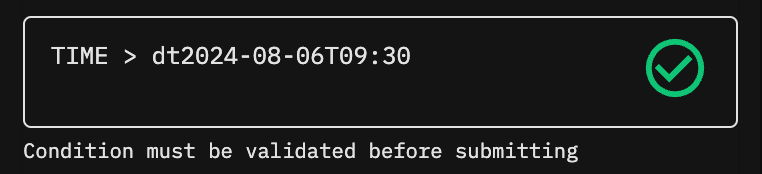
<figure><img src="/files/DUYPc6qDMRbfIWdqFBS7" alt="" width="375"><figcaption><p>A Green Tick indicate that Condition is Valid</p></figcaption></figure>

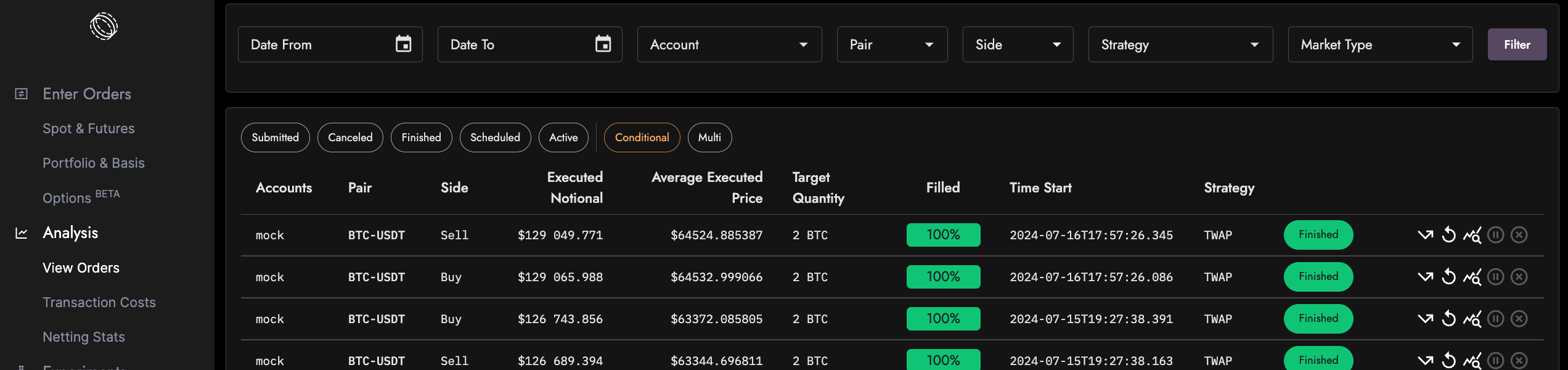
<figure><img src="/files/XTNovlHJHaO6bKbkG65m" alt=""><figcaption><p>Viewing conditional orders</p></figcaption></figure>

## Symbols

### Valid Dynamic Terms

#### Pair Price

```
{Pair}@{Exchange} // ex. ETH:PERP-USDT@Bybit
```

#### Order Fields

```
:qty // order qty in target token
```

orders are submitted with either base\_asset\_qty or quote\_asset\_qty, which is targeting the base or quote token.  Ex. :qty will evaluate to 150 if your order is BUY 150 ETH or 100,000 if BUY 100,000 USDT of ETH

```
:current_target // current scheduled target qty
```

the engine tries to place up to a certain amount at all times and this value changes over time

```
:filled // executed qty in target token
```

always converted to target token same as :qty

#### Current Time

```
TIME // current time in UTC
```

### Valid Operators

* max ( ) , min ( )
* +, -, \*, /, \*\* (exponentiate) , % (modulo)&#x20;
* \>= , <= , > , < , == , !=
* AND , OR

Note the differences between the initialization (?=), assignment (:=), and comparison (==) operators.&#x20;

## Sample Use Cases

### Time Conditions

Using **TIME** as a placeholder for the current time, you can set a time in the future to trigger an order. For example, this order will run on midnight (UTC) on 2023-09-24:

```
TIME > dt2023-09-24T00:00
```

### Price Conditions

By using the common placeholder \<Token Pair>@\<Exchange>, you can assign a price condition. For example, this order will only run when BTC-USDT on Binance hits 30,000 or more:

```
BTC-USDT@Binance > 300000
```

*Note: If you would like the algo order to only trade above this price as well, be sure to place a limit price as well.*

Using basic math operators, you can also specify ratios to trigger orders. For example, this order will run when the BTC/ETH ratio reaches 20 on Binance:

```
( BTC-USDT@Binance / ETH-USDT@Binance ) > 20
```

Taking advantage of other operators, another example can be an order that only triggers when the spread between ETH and ETH:PERP reaches a certain threshold:

```
( ETH-USDT@Binance - ETH:PERP-USDT@Binance ) > 1
```

## Variable Tracking

In certain scenarios, a previous state may be needed to facilitate the right condition. In this case, you can set variables to track through each consecutive evaluation. There are three operators that faciliate variable tracking:&#x20;

* To assign a value to keep track\
  \<Variable name> := \<Dynamic value>
* To assign a value only if null (for initialization)\
  \<Variable name> ?= <(Dynamic) Value>
* To end line and go to the next clause\
  ;

A perfect example is a trailing stop:

<pre><code>TRAILING_STOP ?= BTC-USDT@Binance * 0.7 ;
<strong>TRAILING_STOP := MAX ( BTC-USDT@Binance * 0.7 , TRAILING_STOP ) ;
</strong>TRAILING_STOP > BTC-USDT@Binance
</code></pre>

Breaking down this complex example line-by-line:

* ```
  TRAILING_STOP ?= BTC-USDT@Binance * 0.7 ;
  ```
* Set the initial value of the TRAILING\_STOP variable to 30% away from the current price. This line will not be run unless the TRAILING\_STOP variable is null, which is only true on the first evaluation.
* ```
  TRAILING_STOP := MAX ( BTC-USDT@Binance * 0.7 , TRAILING_STOP ) ;
  ```
* On the evaluation, set the value of TRAILING\_STOP to the higher of either the current 30% away on BTC-USDT or the previous TRAILING\_STOP
* ```
  TRAILING_STOP < BTC-USDT@Binance
  ```
* Run the order if the ultimate condition of BTC-USDT price is less than the TRAILING\_STOP price

##


---

# Agent Instructions: Querying This Documentation

If you need additional information that is not directly available in this page, you can query the documentation dynamically by asking a question.

Perform an HTTP GET request on the current page URL with the `ask` query parameter:

```
GET https://docs.tread.fi/creating-and-submitting-orders/advanced-settings/order-conditions.md?ask=<question>
```

The question should be specific, self-contained, and written in natural language.
The response will contain a direct answer to the question and relevant excerpts and sources from the documentation.

Use this mechanism when the answer is not explicitly present in the current page, you need clarification or additional context, or you want to retrieve related documentation sections.