> For the complete documentation index, see [llms.txt](https://docs.tread.fi/llms.txt). Markdown versions of documentation pages are available by appending `.md` to page URLs; this page is available as [Markdown](https://docs.tread.fi/creating-and-submitting-orders/scale-orders.md).
# Scale Orders
### Scale Orders Feature Overview
Scale Orders is an advanced trading feature that allows you to create multiple limit orders distributed across a price range, rather than placing a single order at one price point.
### Key Benefits
* Reduced Market Impact: Large orders are broken into smaller pieces to minimize price disruption
* Improved Fill Rates: Multiple price levels increase the probability of execution
* Automated DCA: Systematic accumulation or distribution across price ranges
* Liquidity Provision: Create order grids for market making strategies
* Risk Distribution: Spread execution risk across multiple price points
### Core Concept
Instead of placing one large order at a single price, Scale Orders automatically creates multiple smaller orders spread across a price range. For example:
* Instead of: 1 order for 10 BTC at $110,000
* You get: 10 orders of 10 BTC each, spread from $100,500 to $115,000
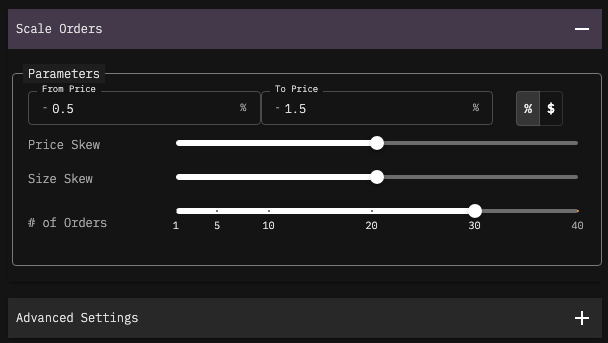
### Key Parameters
#### **Price Range**
* **From Price:** Starting price for the order ladder (can be percentage or absolute)
* **To Price:** Ending price for the order ladder
* **Price Input Modes:**
* Percentage mode: -1% to +1% (relative to current market price)
* Absolute mode: $49,500 to $50,500 (fixed dollar amounts)
#### **Distribution Controls**
* **Price Skew** (-1 to +1): Controls where orders are placed (density across limit price range)
* `0`: Even distribution
* `+1`: More orders concentrated near the "To Price" (higher price end)
* `-1` More orders concentrated near the "From Price" (lower price end)
* **Size Skew (-1 to +1):** Controls how much is allocated to each order (quantity distribution)
* `0`: Equal size for all orders
* `+1`: Larger orders at the edges (both from and to price), smaller in the middle
* `-1`: Larger orders in the center, smaller at the edges
### Visual Representation of Price and Size Skew
**Price Skew**
```
Price Skew = -1 (crowded at start):
$99.00 ●●●●●●●●●●
$99.25 ●●●●●●●
$99.50 ●●●●
$99.75 ●●
$101.00 ●
Price Skew = 0 (linear):
$99.00 ●●●●●●●●●●
$99.50 ●●●●●●●●●●
$100.00 ●●●●●●●●●●
$100.50 ●●●●●●●●●●
$101.00 ●●●●●●●●●●
Price Skew = +1 (crowded at end):
$99.00 ●
$99.25 ●●
$99.50 ●●●●
$99.75 ●●●●●●●
$101.00 ●●●●●●●●●●
```
**Important Context:**
* **Buy orders**: `p_from > p_to` (descending prices: $99.00 → $99.90)
* **Sell orders**: `p_from < p_to` (ascending prices: $100.10 → $101.00)
### Size Skew
{% code overflow="wrap" %}
```
Size Skew = 100% (larger sizes at the prices near the 'from' price when you're buying):
Order 1: $99.00 ████████████ (20% of total)
Order 2: $99.25 ████████ (15% of total)
Order 3: $99.50 ██████ (12% of total)
Order 4: $99.75 ████ (8% of total)
Order 5: $101.00 ██ (5% of total)
Size Skew = 0 (uniform distribution):
Order 1: $99.00 ████████████ (20% of total)
Order 2: $99.25 ████████████ (20% of total)
Order 3: $99.50 ████████████ (20% of total)
Order 4: $99.75 ████████████ (20% of total)
Order 5: $101.00 ████████████ (20% of total)
Size Skew = -100 (larger sizes towards the 'to' price when you're buying):
Order 1: $99.00 ██ (5% of total)
Order 2: $99.25 ████ (8% of total)
Order 3: $99.50 ██████ (12% of total)
Order 4: $99.75 ████████ (15% of total)
Order 5: $101.00 ████████████ (20% of total)
Do the opposite when you are selling (so 100% Skew if you want most of the qty sold to be at the limit prices near your market prices, -100% if you most of the quantity sold near the higest limit prices)
```
{% endcode %}
The visualizations shows that Size Skew affects the **thickness/quantity** of each order, while Price Skew affects the **spacing/density** of orders across the limit price range.
**Order Count**
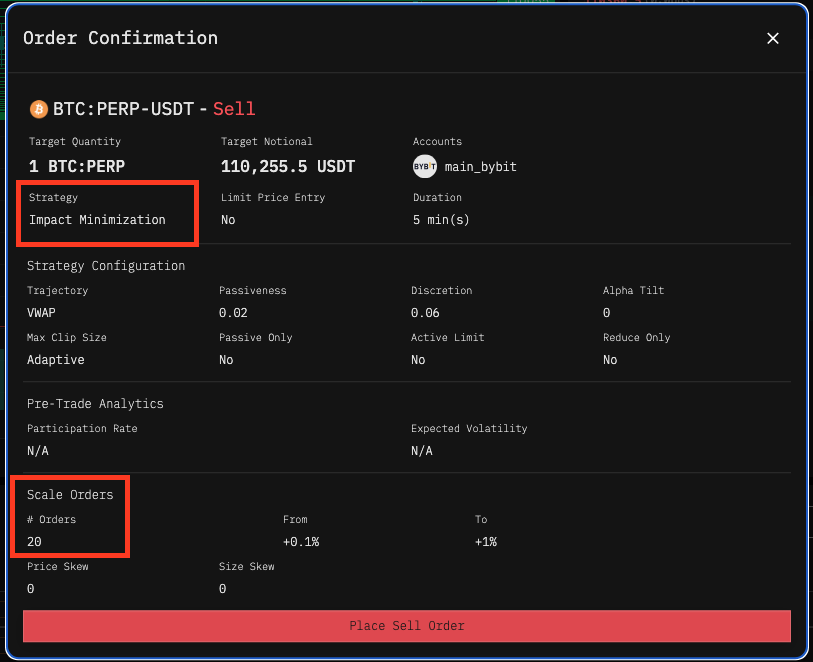
* Number of individual orders to create (1-40 orders)
* Each order gets a portion of your total quantity
#### Order Properties
Each generated order inherits:
* Strategy and execution parameters from the base order
* Duration and scheduling settings
* Account and pair specifications
* Risk management settings (passiveness, discretion, etc.)
### Limitations and Considerations
* **Minimum Order Sizes:** Each individual order must meet exchange minimum size requirements
* **Maximum Order Count:** Limited to a maximum of 40 orders per batch
* **Price Precision:** All prices rounded to exchange tick size requirements
* **Capital Requirements:** Total quantity must be available in selected accounts
### Troubleshooting
#### Common Issues
* **Insufficient Liquidity:** Reduce order count or narrow price range
* **Minimum Size Violations:** Increase total quantity or reduce order count
* **Price Range Too Narrow:** Widen range to accommodate minimum tick sizes
#### Error Messages
* **"Need one of the qty fields":** Specify either base or quote quantity
* `"order_count must be > 0":` Set order count to at least 1
* `"total_qty must be > 0":` Specify a positive total quantity
* `"Unable to get price for pair":` Verify pair is available on selected exchange
####