# Connecting to Exchanges

### Supported Exchanges

* [**Aster**](/account-creation-and-api-key-connection/connecting-to-exchanges/aster.md)
* [**Binance**](/account-creation-and-api-key-connection/connecting-to-exchanges/binance.md)
* [**Bitget**](/account-creation-and-api-key-connection/connecting-to-exchanges/bitget.md)
* [**Bybit**](/account-creation-and-api-key-connection/connecting-to-exchanges/bybit.md)
* [**Deribit**](/account-creation-and-api-key-connection/connecting-to-exchanges/deribit.md)
* [**OKX**](/account-creation-and-api-key-connection/connecting-to-exchanges/okx.md)
* [**OKXDEX**](/dex-swaps-trading/dex-trading-wallet-setup.md)
* [**Gate**](/account-creation-and-api-key-connection/connecting-to-exchanges/gate.md)
* [**Hyperliquid**](/account-creation-and-api-key-connection/connecting-to-exchanges/hyperliquid.md)
* [**Nado**](/account-creation-and-api-key-connection/connecting-to-exchanges/nado.md)
* [**Pacifica**](/account-creation-and-api-key-connection/connecting-to-exchanges/pacifica.md)
* [**Paradex**](/account-creation-and-api-key-connection/connecting-to-exchanges/paradex.md)
* Coinbase Exchange (distinct from retail Coinbase)

Please refer to the comprehensive list [below](#supported-exchanges-products-and-account-types) for details on supported exchanges, products, and account types available for each corresponding exchange.

**Prerequisite.** You must first create an API key for the exchanges you wish to trade on. Refer to the exchange's specific instructions above.

### Linking to Exchanges on tread.fi

### Connecting Your Keys

1. Access the **Key Management** menu by clicking the wallet icon on the top right.

<figure><img src="/files/WLTWqL96p7kyEuLW8O6v" alt=""><figcaption></figcaption></figure>

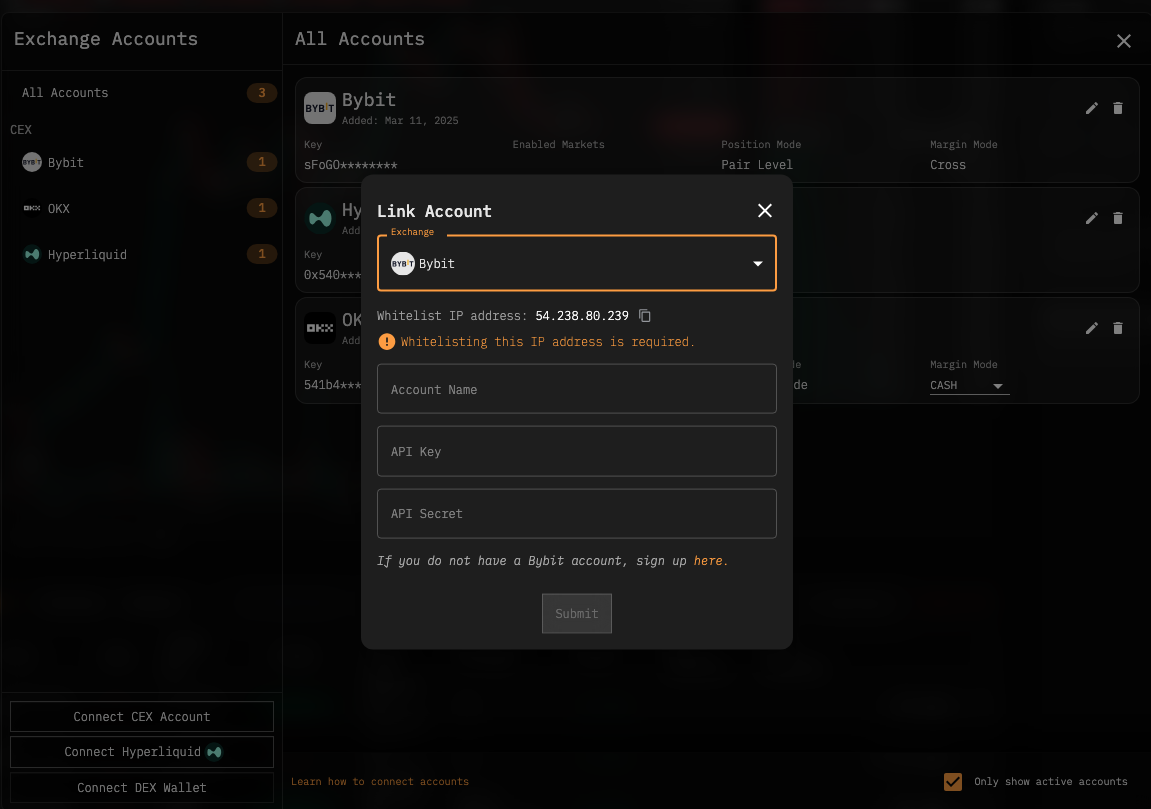
2. Select the type of exchange you would like to connect from the bottom right corner of the menu.

<figure><img src="/files/hT1vX9OltHhQyCp7BGVP" alt=""><figcaption></figcaption></figure>

3. Enter the required API credentials.

<figure><img src="/files/1LuH9XcF2bvYalnqdmla" alt=""><figcaption></figcaption></figure>

**Important:**&#x20;

* For Centralized Exchanges (CEX), you must whitelist our IP Address, please follow the steps to find the I.P. address to whitelist.&#x20;
* To do this, copy and paste the IP address displayed on the screen into the respective Exchange's API Management section.

Once your keys are successfully connected, they will appear in your list of accounts on the **Key Management** page and the **Portfolio** page.

## Authorized Groups (Institutional Plan Only)

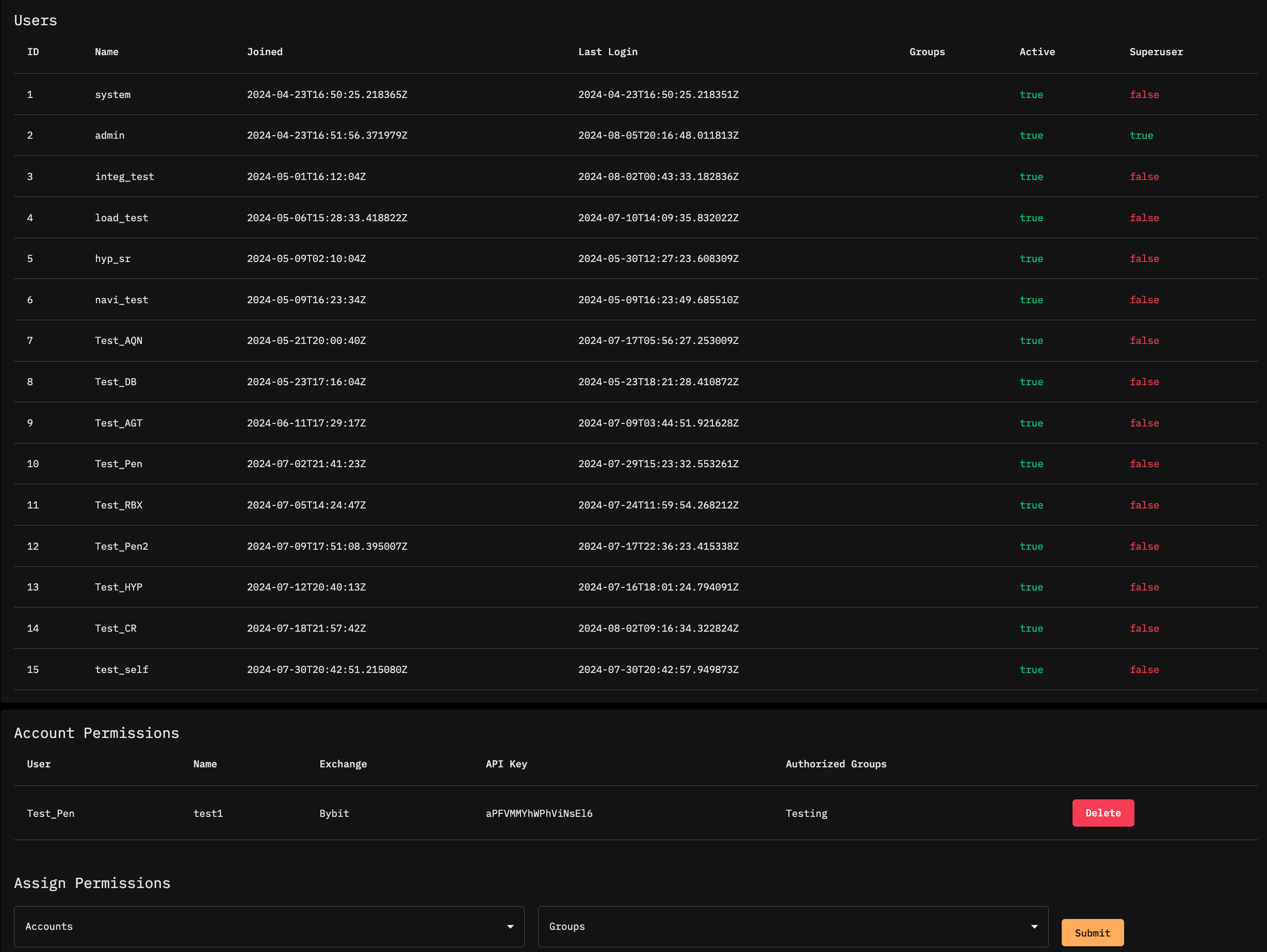
Superuser accounts can assign API keys to specific user groups.

<figure><img src="/files/TnsdktHJPDBCKqe813in" alt=""><figcaption></figcaption></figure>

1. Click **Admin Panel** from the account menu on the upper right.
2. Navigate to the **Assign Permissions** section.
3. Assign accounts to the appropriate user groups.

Users in authorized groups can now see balances and trade using the permissioned accounts. The authorized key will be displayed as `<owner>/<account_name>`. To revoke authorization, delete the permission row from the **Admin Panel** for the specific group and account.

### Supported Exchanges, Products and Account Types

<table><thead><tr><th width="167.33333333333331">Exchange</th><th width="195">Supported Asset Classes</th><th>Supported Account Types</th><th>Notes</th></tr></thead><tbody><tr><td>Aster</td><td>Perps</td><td></td><td></td></tr><tr><td>Binance</td><td>Spot<br>Perpetual Futures<br>Options</td><td><code>SPOT</code><br><code>PERP</code><br><code>OPTION</code></td><td></td></tr><tr><td>Binance PM (Portfolio Margin)</td><td></td><td><code>PORTFOLIO_MARGIN</code></td><td>Binance Portfolio Margin uses a distinct set of API endpoints, known as PAPI endpoints, which are separate from the regular Spot, Margin, and Futures APIs used on standard Binance accounts, and therefore it is treated as a separate exchange integration.</td></tr><tr><td>Bitget</td><td><p></p><p>Spot</p><p>Margin</p><p>USDT Futures</p><p>USDC Futures</p><p>COIN Futures</p></td><td><p></p><ul><li>Unified</li><li>Spot</li><li>Margin</li><li>Future</li><li>Perp</li></ul></td><td></td></tr><tr><td>Bybit</td><td>Spot<br>Perpetual Futures</td><td><code>Unified Margin</code></td><td></td></tr><tr><td>Deribit</td><td>Spot<br>Perpetual Futures<br>Dated Futures<br>Options</td><td><code>Cross Margin</code></td><td></td></tr><tr><td>Coinbase Exchange</td><td>Spot</td><td><code>SPOT</code></td><td>Margin/Leverage <strong>not supported</strong><br><sub>Note: Coinbase Exchange is not to be confused with the retail Coinbase App/Platform.</sub> </td></tr><tr><td>OKX</td><td>Spot<br>Perpetual Futures<br>Options</td><td><p><code>CROSS</code> (default)</p><p><code>ISOLATED</code><br><code>CASH</code><br><code>SPOT_ISOLATED</code></p></td><td>Quantities on OKX are adjusted to be 1:1 with base asset quantity. There is no need to convert to contract size.<br>Margin mode is configurable with the <code>margin_mode</code> parameter.</td></tr><tr><td>OKXDEX</td><td>Spot (DEX Contract Addresses)</td><td></td><td>Please refer to specific DEX-specific <a href="/pages/FpQxrD3TOITawoFgrPar">documentation</a></td></tr><tr><td>Gate.io</td><td>Spot<br>Perpetual Futures</td><td><code>SPOT</code><br><code>PERP</code><br><code>UNIFIED</code></td><td>Futures/unified accounts are configurable in-app</td></tr><tr><td>Hyperliquid</td><td>Spot<br>Perpetual Futures</td><td><p><code>CROSS</code></p><p><br><br><br></p></td><td><p>Connect via wallet-connection only instead of API Keys. Ensure your Hyperliquid account has funds before connecting.</p><p>Visit Hyperliquid to deposit if needed.</p></td></tr><tr><td>Bitget</td><td>Spot</td><td><code>SPOT</code></td><td>Accounts can be linked to track portfolio but trading is not yet supported</td></tr><tr><td>Pacifica</td><td>Perps</td><td></td><td></td></tr><tr><td>Paradex</td><td>Perps</td><td><code>CROSS</code></td><td></td></tr></tbody></table>


---

# Agent Instructions: Querying This Documentation

If you need additional information that is not directly available in this page, you can query the documentation dynamically by asking a question.

Perform an HTTP GET request on the current page URL with the `ask` query parameter:

```
GET https://docs.tread.fi/account-creation-and-api-key-connection/connecting-to-exchanges.md?ask=<question>
```

The question should be specific, self-contained, and written in natural language.
The response will contain a direct answer to the question and relevant excerpts and sources from the documentation.

Use this mechanism when the answer is not explicitly present in the current page, you need clarification or additional context, or you want to retrieve related documentation sections.
