> For the complete documentation index, see [llms.txt](https://docs.tread.fi/llms.txt). Markdown versions of documentation pages are available by appending `.md` to page URLs; this page is available as [Markdown](https://docs.tread.fi/order-tracking-and-portfolio-management/order-history.md).
# Order History
Clicking "Orders" on the top navigation bar opens a table displaying all historical orders for the selected user account. Traders can filter this list using various parameters to locate specific trades efficiently.
Click the magnifying class to view your execution history and performance
### Available Filters
Filter Menu in Order Management
* Date Range – Narrow down the timeframe of displayed orders.
* [Trading Pair](/creating-and-submitting-orders/advanced-settings/order-templates/pair-naming.md) – View orders for a specific asset pair.
* Side – Filter by buy or sell orders.
* [Strategy](/creating-and-submitting-orders/strategies.md) – Display orders based on the selected execution strategy.
* Market Type – Choose between different market types (e.g., spot, perps, futures and options).
* Order Status – Select from Active, Canceled, Finished, Scheduled, Paused, Conditional.
* Order Type – Refine by Single, [Multi](/other-trading-modes/multi-spread-basis-portfolio-trading.md), or Chained orders.
### Order History Table
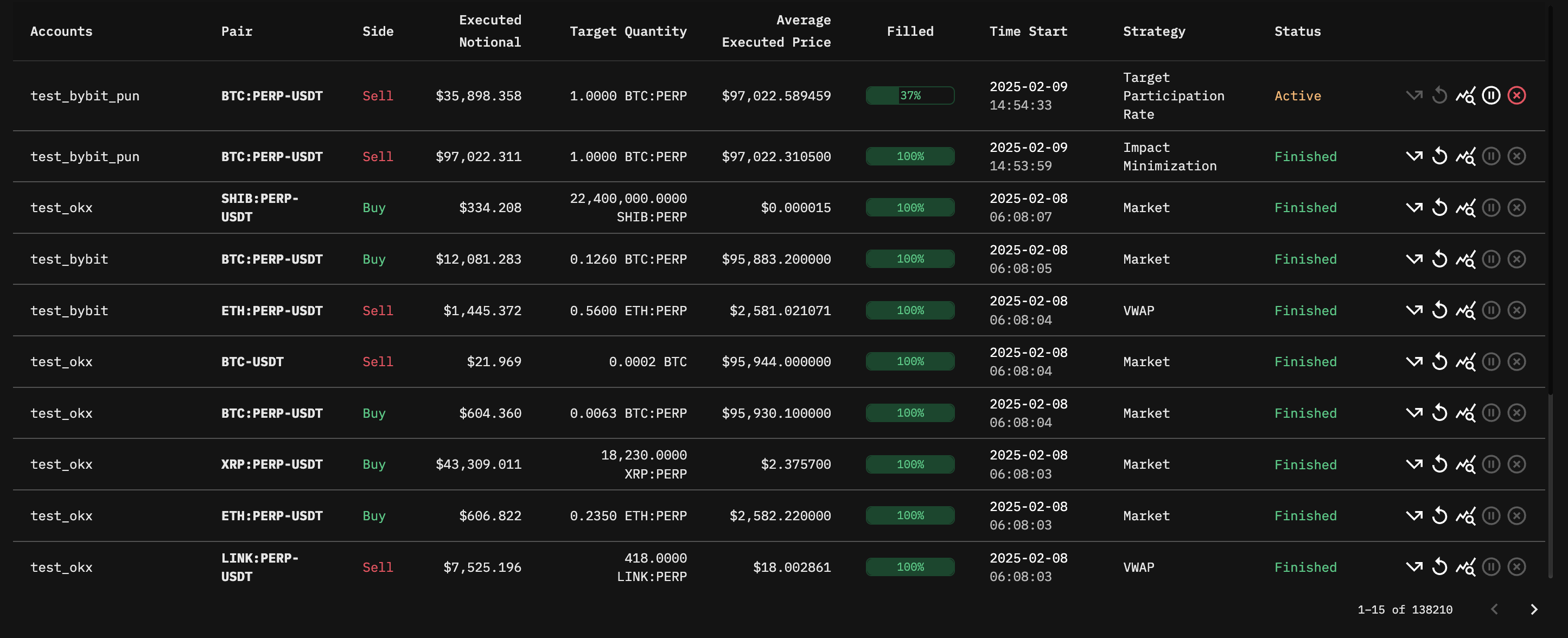
There is no limit to the number of historical orders displayed, but pagination helps navigate through large datasets efficiently.
Order History Table in Order Management
Each row in the order history table includes key details such as:
* Accounts – The account associated with the order.
* [Pair](/creating-and-submitting-orders/advanced-settings/order-templates/pair-naming.md) – The trading pair for the order (e.g., BTC:PERP-USDT).
* Side – Whether the order is a Buy or Sell or [Multi](/other-trading-modes/multi-spread-basis-portfolio-trading.md).
* Executed Notional – The total value of the executed portion of the order.
* Target Quantity – The originally intended trade size.
* Average Executed Price – The price at which the order was filled on average.
* Filled Percentage – The proportion of the order that has been completed.
* Time Start – The timestamp when the order was initiated.
* [Strategy](/creating-and-submitting-orders/strategies.md) – The trading strategy used for execution.
* Status – The current state of the order (e.g., Active, Finished, Canceled).
* Order Actions – Available actions such as Resubmit, Amend, Pause, Cancel, or View Order Details.