> For the complete documentation index, see [llms.txt](https://docs.tread.fi/llms.txt). Markdown versions of documentation pages are available by appending `.md` to page URLs; this page is available as [Markdown](https://docs.tread.fi/bots/market-maker-bot/reference-price-modes-and-risk-controls.md).
# Reference Price Modes and Risk Controls
### Overview
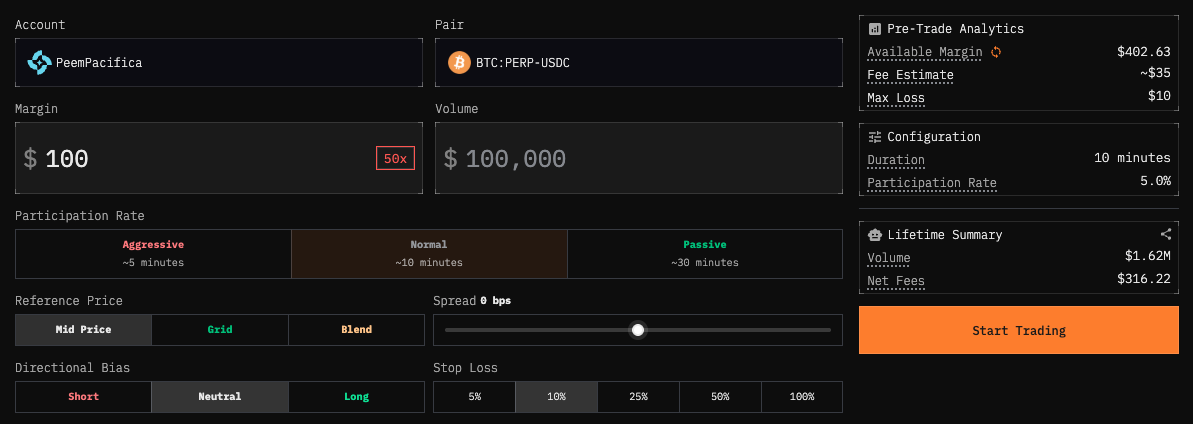
While the default Market Maker Bot settings (Mid Mode) are designed to allow you to boost orderbook liquidity while remaining market-neutral, the **Reference Price Modes (Mid, Grid, Reverse Grid, Blend and Signal)** are advanced settings that allows you to express a specific view on the market and potentially make a profit in the process of your market making.
The Reference Price determines the "center" point for your buy and sell orders. Your available spread options (see [below](#spread)) change depending on which reference mode you select.
> ⚠Risk Warning: Some reference price mode settings move the bot away from pure neutral market making/liquidity provision. For example, Revers Grid Mode allows the bot to also do market orders, not just limit orders. Furthermore, incorrect configurations (e.g., Grid Mode in a trending market) can lead to stalled orders or increased losses additional to fees.
Familiarize yourself with the other settings before adjusting these settings, then explore strategies for each use case on the following page.
{% content-ref url="/pages/DvZMf93lcCc7SI15AHhV" %}
[Participation Rate and Duration](/bots/market-maker-bot/participation-rate-and-duration.md)
{% endcontent-ref %}
{% content-ref url="/pages/PX9u2lJnsRD43RMhaNfa" %}
[Strategies & Configurations](/bots/market-maker-bot/strategies-and-configurations.md)
{% endcontent-ref %}
### Reference Price Modes
{% content-ref url="/pages/cpMoMjIFh6UNRHCDV9aD" %}
[Mid Mode](/bots/market-maker-bot/reference-price-modes-and-risk-controls/mid-mode.md)
{% endcontent-ref %}
{% content-ref url="/pages/myx82PFrsQymtArtbkXJ" %}
[Grid Mode](/bots/market-maker-bot/reference-price-modes-and-risk-controls/grid-mode.md)
{% endcontent-ref %}
{% content-ref url="/pages/B71RmuqYWiQhOM2XTJNm" %}
[Reverse Grid Mode (RGrid)](/bots/market-maker-bot/reference-price-modes-and-risk-controls/reverse-grid-mode-rgrid.md)
{% endcontent-ref %}
{% content-ref url="/pages/1NLsUyrxt4YydyTpSCbp" %}
[Blend Mode](/bots/market-maker-bot/reference-price-modes-and-risk-controls/blend-mode.md)
{% endcontent-ref %}
{% content-ref url="/pages/MPfE2jlPDZNTr5CuNSHw" %}
[Signal Mode](/bots/market-maker-bot/reference-price-modes-and-risk-controls/signal-mode.md)
{% endcontent-ref %}
### Risk Management Controls (Grid Reset and Stop Loss)
### Stop Loss
The Stop Loss setting allows you to set your maximum acceptable loss as a percentage of your margin. The bot monitors your profit/loss in real time and automatically cancels all orders if your net loss reaches this threshold, then closes any remaining positions to ensure zero directional exposure.
**How It Works:**
The bot continuously monitors your net PnL (realized and unrealized). The stop loss threshold is calculated as a percentage of your margin allocation:
* **Formula:** `Max Loss = (Stop Loss % ÷ 100) × Margin`
* **Example:** With a 5% stop loss and $1,000 margin, your Max Loss is $50. If your net PnL drops to -$50, the bot automatically cancels all orders and closes positions.
* 100% means you are willing to lose the entirety of your inputted margin from market making losses.
Losses from market making typically accumulate when one-sided exposure building up due to lack of fills from the opposite leg, and the market moves against your one-sided exposure.
> ⚠Risk Warning: Stop Loss may not prevent liquidation when using high leverage (>20x). During extreme moves, the exchange can liquidate your position before the stop loss triggers, especially if the bot is stuck with one-sided exposure. This can result in losses exceeding your Max Loss. Exercise caution with high leverage, particularly in volatile markets.
### Grid Reset Threshold (Only Available for Grid Mode)
The Soft Reset acts as a "circuit breaker" before your Stop Loss triggers, giving your position a chance to naturally rebalance without forcing a full exit. Think of it as a stop loss before your stop loss.
**Behavior:** When the market drifts from your last executed price (exposure price) by the configured threshold, the bot temporarily switches the "behind" leg (the side with less executed volume) from grid pricing to mid-market pricing. This helps the unfilled leg execute and rebalance exposure, potentially avoiding a Stop Loss trigger.
Instead of waiting for the bot to hit the stop loss and forcefully cancelling the entire order at a loss, the grid reset threshold engages first. The bot temporarily switches to mid-market mode to accept a smaller loss, rebalances, then returns to grid mode to pursue profits again.
**How It Works:**
1. **Normal Operation:** Bot quotes based on your last executed price (Grid Mode) + some spread.
1. For example (assuming Grid 0): Bot last bought BTC at $90,000, it will place a sell limit order at $90,000
2. **Soft Reset Triggered:** When price drifts by your configured percentage, bot temporarily switches to quoting on mid-market price
1. Continuing from the same example: Bot is waiting to reduce it's long position, but BTC price falls below 90K. Instead of trying to sell BTC at $90,000, it places a sell limit order at the mid-market price instead.
3. **Position Resets:** The unfilled leg has a better chance to execute at current market levels
4. **Return to Normal:** Once exposure rebalances, bot returns to Grid Mode behavior
**What Each Setting Means:**
* **Lower Number = More Conservative:** Grid Reset triggers earlier, giving the position more chances to rebalance but potentially sacrificing some profit potential.
* **Higher Number = More Patient:** Grid Reset triggers later, allowing the market more room to revert but accepting deeper unrealized losses before intervention.
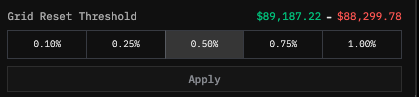
The red and green numbers on the order monitoring page show the price levels at which Grid Reset triggers, based on your configured threshold as the order is live.
**How to Read Them:**
* **Green Number:** When you're overexposed on the sell/short leg, the green number shows the price level the market must rise by before Grid Reset triggers. The bot will then try to close this short (through passive limit orders) at the prevailing mid price, preventing further losses.
* **Red Number:** When you're overexposed on the buy side, the red number shows the price level the market fall by before Grid Reset triggers. The bot will then try to close this long at the prevailing mid price, again preventing further losees.
**Pros:**
* Provides some breathing room for adverse price movement before hitting hard stop loss
* Increases chances of completing round-trip trades in trending markets
* Helps avoid premature exits while still maintaining risk control
**Cons:**
* Incur a loss.
* May execute at less favorable prices compared to waiting for full reversion
* In strongly trending markets, even the soft reset might not prevent eventual stop loss