> For the complete documentation index, see [llms.txt](https://docs.tread.fi/llms.txt). Markdown versions of documentation pages are available by appending `.md` to page URLs; this page is available as [Markdown](https://docs.tread.fi/order-tracking-and-portfolio-management/portfolio/portfolio-tab.md).
# Portfolio (Tab)
### Overview
The Portfolio tab provides a comprehensive view of your account's financial position, including real-time balance information, performance metrics, and detailed asset breakdowns. This tab is the central hub for monitoring your trading account's health and performance.
### Key Features
#### Portfolio Summary Cards
The top section displays three key summary cards.
**Total Equity**
* **Displays:** Your current overall portfolio value in USD
* **Calculation:** Sum of cash, spot asset holdings, and net profit/loss from all open perpetual futures positions
* **Time comparisons:** Shows percentage changes over 1 day and 7 days
**Directional Bias**
* **Displays:** Your portfolio's overall lean towards long or short positions and an overall net exposure value in USDT with bias classification
* **Classifications:**
* **Long Bias:** More long positions than short
* **Short Bias:** More short positions than long
* **Delta Neutral:** Balanced long/short exposure
* **Adjusted L/S Ratio:** Shows the percentage breakdown of your long/short exposure
**Unrealized PnL (Not available for DEX accounts)**
* **Displays:** Current profit or loss on your open positions
* **Display:** Value in USDT with ROI percentage
#### Total Equity Chart
A comprehensive chart showing your portfolio's performance over time:
**Chart Features**
* **Total Equity Line:** Your portfolio value over time (white line)
* **Components included:** Cash/stablecoins + spot holdings + unrealized PnL from perpetual futures positions
* **Gross Market Value (GMV) Line:** Gross Market Value showing total market exposure (orange line) calculated as:
* **Sum of absolute notional values** from all perpetual futures positions only
* **Excludes:** Cash, spot holdings, and other non-position assets
* **Purpose:** Shows your total leveraged exposure to the market, regardless of direction
* **Time Frame Controls:** Buttons to switch between 1d, 7d, 30d, and 1y views
* **CSV Export:** Download button to export historical equity data
**Chart Interactions**
* Hover over data points to see exact values
* Transfer markers show the amount and asset type of deposits/withdrawals
* Multiple transfers near the same time are grouped and offset for clarity
### Additional Charts (Non-DEX accounts only)
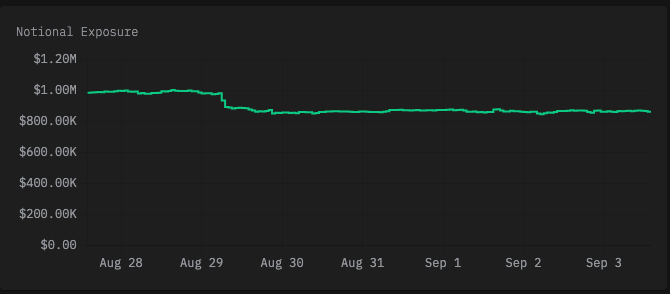
**Notional Exposure Chart**
* Shows your net market exposure over time
* Helps track how your position sizes change
* Color-coded: Green for positive exposure, red for negative
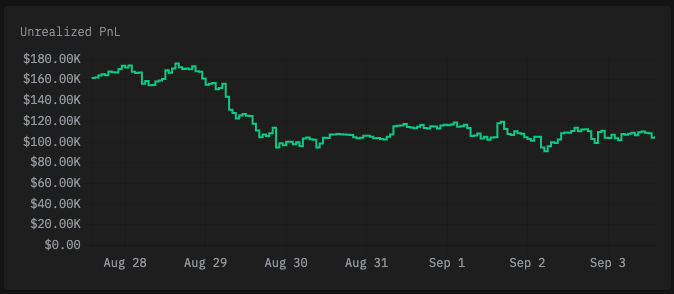
**Unrealized PnL Chart**
* Displays your unrealized profit/loss over time
* Useful for tracking performance trends
* Shows the impact of market movements on your positions
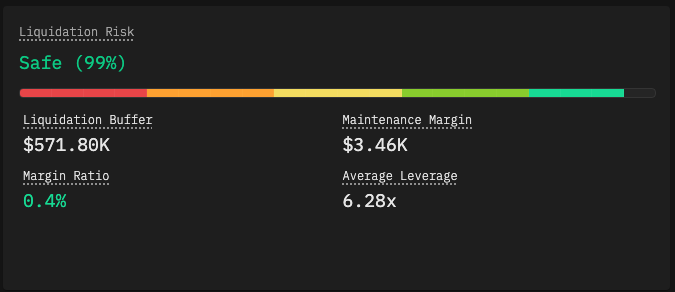
**Liquidation Risk Panel (Perpetual Futures only)**
* **When shown:** Only appears if you have open perpetual futures positions
* **Key metrics:**
* **Liquidation Buffer:** Available funds above maintenance margin
* **Maintenance Margin:** Required margin to maintain positions
* **Margin Ratio:** Maintenance margin as percentage of wallet balance
* **Average Leverage:** Weighted average leverage across positions
* **Risk Assessment:** Color-coded risk levels from safe to high risk
* **Progress Bar:** Visual representation of liquidation risk
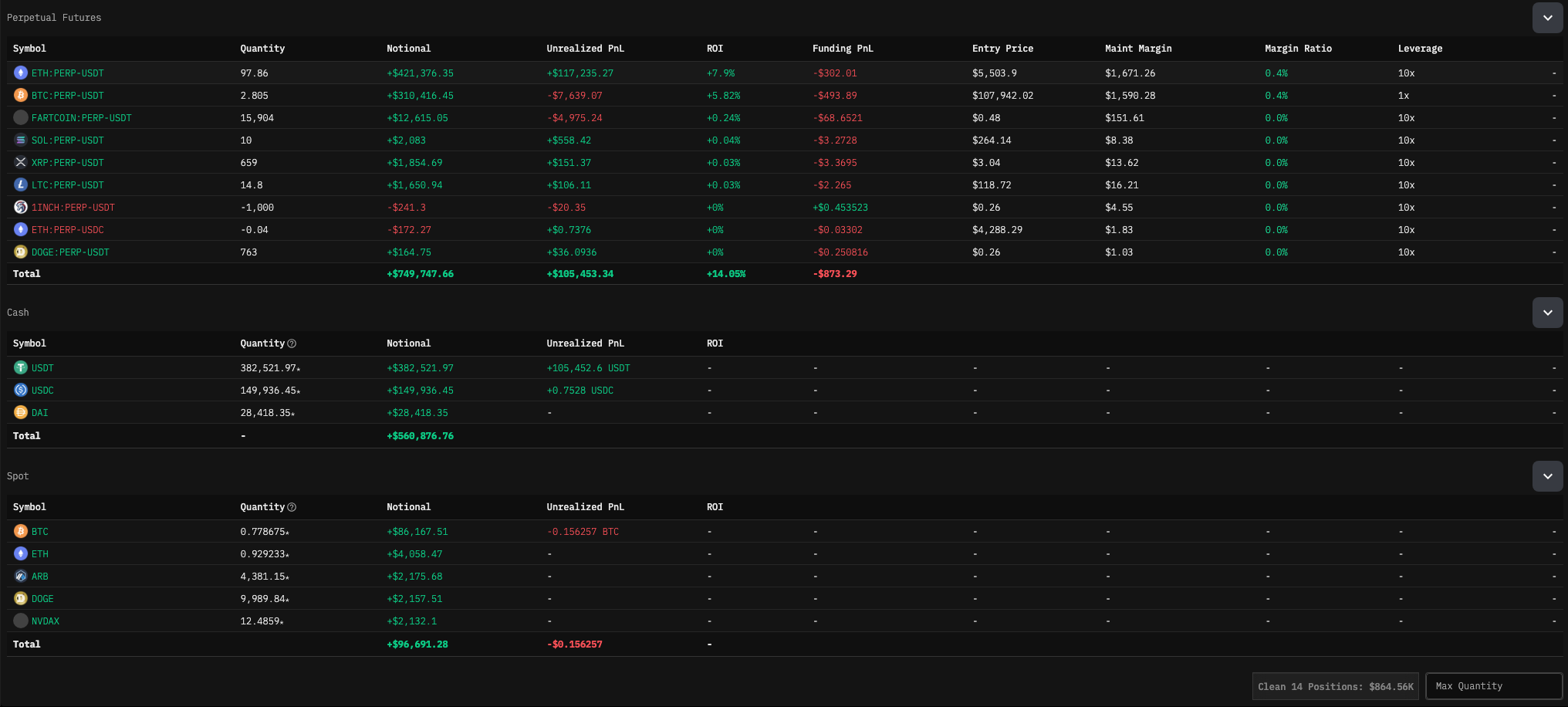
#### 4. Asset Breakdown Tables
Your assets are organized into expandable sections by market type:
**Market Type Categories**
* **Perpetual Futures:** Leveraged positions with funding fees
* **Spot:** Regular cryptocurrency holdings
* **Spot Margin:** Leveraged spot positions
* **Cash:** Stablecoins and fiat currencies